Members & roles
Invite staff, remove access, and what each role may do.
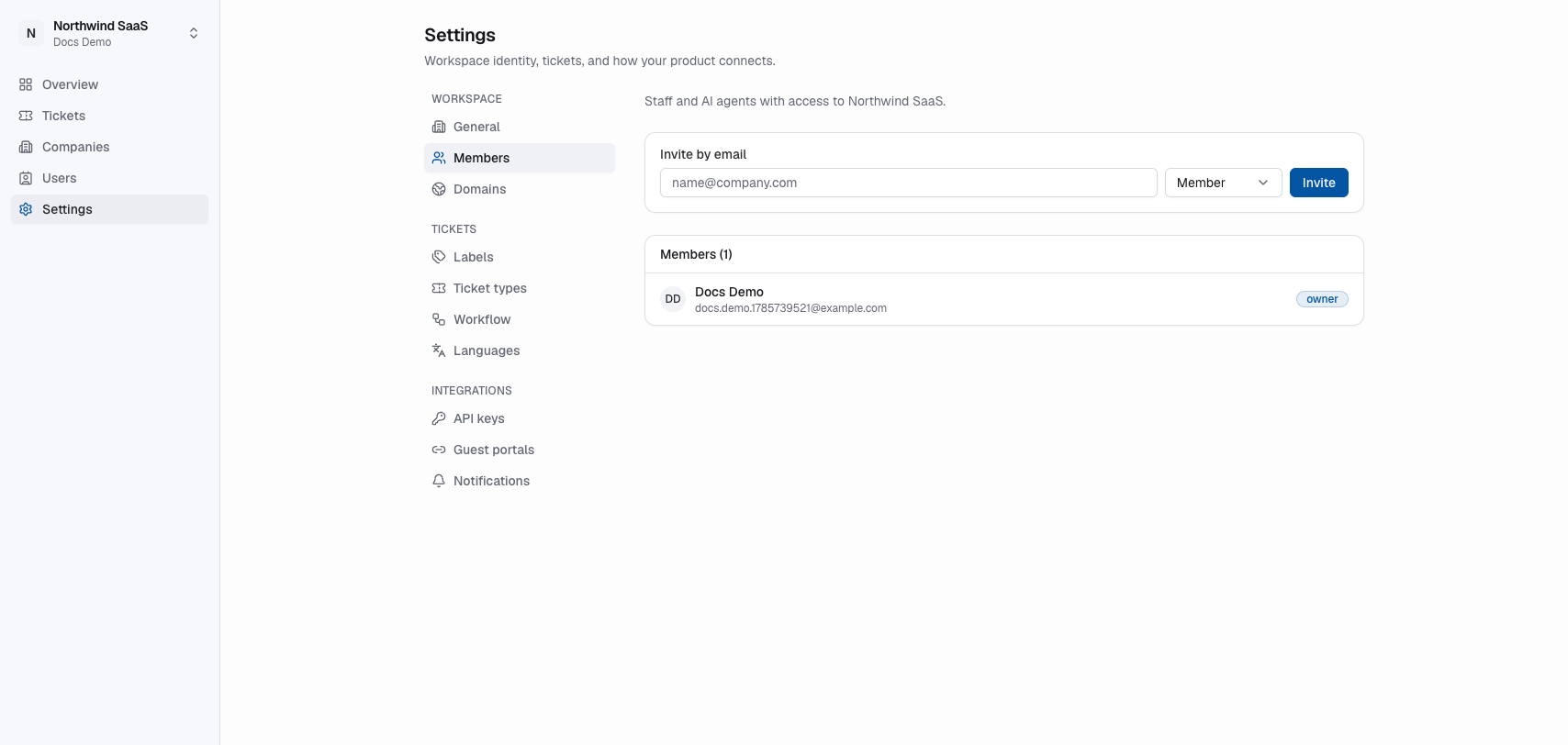
Settings → Members manages who can log into the team app for this workspace — people and AI agents.
Invite
- Enter the teammate’s email under Invite by email.
- Choose a role: Owner, Admin, Agent or Member.
- Click Invite.
- They open the invite link, sign in or create an account, and join.
Only owners and admins can invite, and only an owner can invite another owner.
Remove or cancel
- Remove a member to revoke their workspace access right away. Owners can't be removed here.
- Cancel a pending invitation if the email was wrong or the person should not join.
Changing the role of someone who has already joined isn't available in the dashboard yet.
Staff membership is unrelated to portal end-users. Acme employees are not “members” unless you deliberately invite them as staff.
Roles
| Role | Meant for |
|---|---|
| Owner | Whoever created the workspace, plus anyone they make co-owner. Everything an admin can do, plus host API keys and inviting owners. |
| Admin | People who run the workspace: settings, members, deleting and merging records. |
| Member | Your team’s day-to-day work: tickets, CRM, events, newsletters. |
| Agent | AI agents working in the workspace (for example over MCP). Same as a member, except that it only drafts newsletters. |
Who can do what
✓ = allowed. Where a row says “everyone”, all four roles may do it.
Tickets and workspace
| Action | Owner | Admin | Member | Agent |
|---|---|---|---|---|
| Create, edit, assign, comment on, move and archive tickets | ✓ | ✓ | ✓ | ✓ |
| Labels, ticket types, ticket templates, workflow, languages | ✓ | ✓ | ✓ | ✓ |
| Guest portals, outgoing email server, your own email notifications | ✓ | ✓ | ✓ | ✓ |
| Add, edit, reorder and delete boards | ✓ | ✓ | ||
| Workspace name, logo, domains, require a second factor | ✓ | ✓ | ||
| Invite members, cancel invitations, remove members | ✓ | ✓ | ||
| Install, configure and uninstall addons | ✓ | ✓ | ||
| Create and revoke host API keys | ✓ |
Everyone can open the App Store and see what is installed.
CRM
| Action | Owner | Admin | Member | Agent |
|---|---|---|---|---|
| See accounts, contacts, deals, meetings and tasks | ✓ | ✓ | ✓ | ✓ |
| Create and edit accounts, contacts and deals (also someone else’s deal) | ✓ | ✓ | ✓ | ✓ |
| Add notes, calls, tasks and meetings; edit and delete your own | ✓ | ✓ | ✓ | ✓ |
| Turn a meeting’s next steps into tickets | ✓ | ✓ | ✓ | ✓ |
| Add files to an account | ✓ | ✓ | ✓ | ✓ |
| Edit or delete someone else’s note, call, task or meeting | ✓ | ✓ | ||
| Delete accounts, contacts, deals and account files | ✓ | ✓ | ||
| Merge duplicates | ✓ | ✓ | ||
| Import from a spreadsheet (and undo an import) | ✓ | ✓ | ||
| Switch the CRM on or off, pipelines, fields and other CRM settings | ✓ | ✓ |
Anyone may tick a task done or reopen it, even one someone else created.
Events
| Action | Owner | Admin | Member | Agent |
|---|---|---|---|---|
| See, create and edit events; manage registrations and invitations | ✓ | ✓ | ✓ | ✓ |
| Delete events | ✓ | ✓ | ||
| Switch events on or off and change event settings | ✓ | ✓ |
Newsletter
| Action | Owner | Admin | Member | Agent |
|---|---|---|---|---|
| See campaigns, lists and subscribers | ✓ | ✓ | ✓ | ✓ |
| Write and edit campaigns | ✓ | ✓ | ✓ | ✓ |
| Send and delete campaigns | ✓ | ✓ | ✓ | |
| Add and edit subscribers | ✓ | ✓ | ✓ | |
| Import, export and erase subscribers | ✓ | ✓ | ||
| Manage mailing lists and newsletter settings | ✓ | ✓ |
Buttons you may not use are hidden or greyed out. If you try anyway — for example from an AI agent — you get: You don't have permission to do this. Ask an owner or admin of this workspace.
Roles are fixed for now
The four roles are the same in every workspace. Custom roles, and rules like “only my own deals”, are not available yet.