MCP for agents
Connect Claude, Cursor, Codex, or Grok so AI agents work tickets like staff.
SolutionDesk exposes a staff-facing MCP server (Model Context Protocol). Agents act with your staff identity — same tenant isolation and visibility rules as the dashboard.
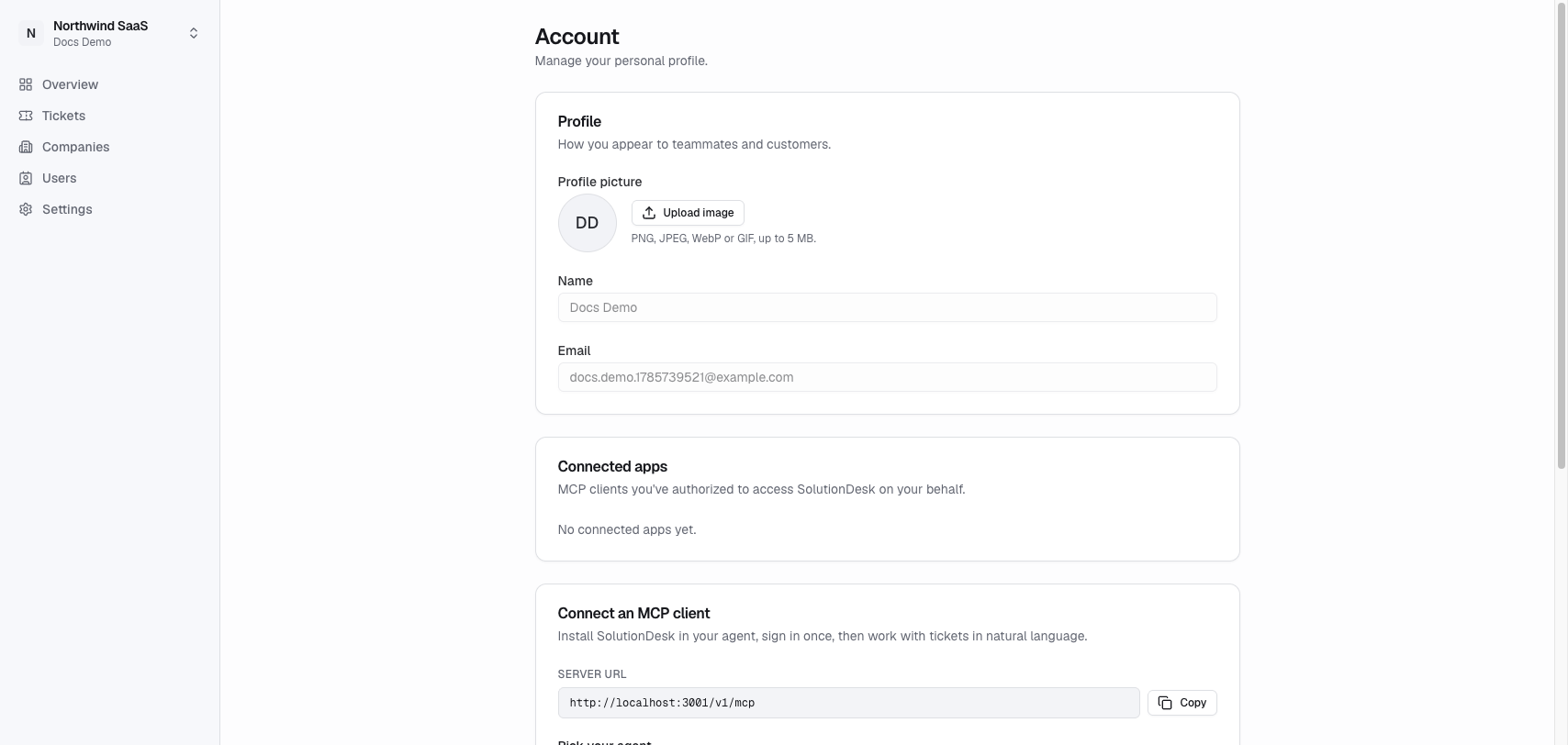
You configure this under Account (not Settings): connect clients and review authorized apps.
Where it lives
- Open the workspace switcher / user menu → Account (or go to
/{workspace}/account). - Connected apps — MCP clients you already authorized (revoke anytime).
- Connect an MCP client — install commands for Claude Code, Cursor, Codex, and Grok Build.
The server URL is always:
https://<your-api-host>/v1/mcpExample (local portless): https://api.solutiondesk.localhost/v1/mcp
Example (dev cloud): https://api.dev.solutiondesk.io/v1/mcp
Connect a client
Claude Code
claude mcp add --transport http solutiondesk https://<api-host>/v1/mcpThen in Claude run /mcp, sign in, and approve access.
Cursor
Merge into ~/.cursor/mcp.json (or project .cursor/mcp.json):
{
  "mcpServers": {
    "solutiondesk": {
      "url": "https://<api-host>/v1/mcp"
    }
  }
}
Reload MCP in Cursor settings.
Codex
codex mcp add solutiondesk --url https://<api-host>/v1/mcp
codex mcp login solutiondesk
Login opens a browser to authorize with your SolutionDesk account.
Grok Build
grok mcp add --transport http solutiondesk https://<api-host>/v1/mcpAuthorize from /mcps if the client does not open a browser automatically.
What agents can do
Tools take a workspace slug (from list_workspaces) on every call.
Reads
| Tool | Purpose |
|---|---|
list_workspaces | Workspaces you can access (slugs for other tools) |
list_tickets | Active tickets (same visibility as the board). archived: true or mode: "all" |
get_ticket | Ticket + comments + labels + attachments + activity |
list_comments | Conversation oldest-first (includes internal notes) |
list_members | Staff roster + isYou for “assign to me” |
list_statuses / get_ticket_config | Board columns / full type-priority-status config |
list_groups / list_labels / list_companies | Catalog ids for assign/toggle/attach |
list_end_users | Portal users |
list_guest_portals | Guest portals (hasPassword only) |
get_languages / get_notification_preferences | Workspace languages / your email prefs |
Writes
| Tool | Purpose |
|---|---|
create_ticket | Create a ticket (type/priority/status default from config). Optional company: companyId or host companyExternalId |
update_ticket | Patch type, fields, priority, company, or group. A type change keeps the ticket's fields. Title is not editable after create |
add_comment | Reply; internal: true = staff-only note |
set_ticket_status | Move status |
assign_ticket | Full replacement of assignees (empty array unassigns) |
archive_ticket / unarchive_ticket | Archive is orthogonal to status |
toggle_ticket_label / move_ticket_on_board | Labels and kanban rank |
create_company / update_company | Companies (including two-tier supportTier) |
create_group / update_group / delete_group | Named ticket groups |
create_label / update_label / delete_label | Workspace labels |
save_ticket_templates / save_ticket_types / save_ticket_config / add_status / update_status / delete_status | Ticket templates, types, and workflow |
create_end_user / update_end_user / create_portal_link | Users page |
create_guest_portal / update_guest_portal / set_guest_portal_password / delete_guest_portal | Guest portals |
save_languages / save_notification_preferences | Languages and your notification matrix |
request_attachment_upload / finalize_attachment | Same SAS upload as the dashboard: PUT bytes, then finalize |
Writes show up live on the dashboard the same way UI mutations do.
Boards
Ticket, settings, status, label and group tools take an optional board (its name in the address, e.g. development). Without one they act on the customer board (“Support”) — list_tickets too, so ask for a board to see its tickets. list_boards shows the boards; owners and admins can create, rename and archive boards (create_board, update_board, archive_board). move_ticket_to_board moves a ticket with its subtasks: run it with dryRun first to see how values carry over, and confirm explicitly when customers gain or lose access — see Boards.
CRM
While the CRM is switched on, agents get the CRM too. All of it is staff-only: nothing an agent writes here reaches customers, except the tickets it deliberately creates from a meeting.
| Tool | Purpose |
|---|---|
list_crm_accounts / get_crm_account / create_crm_account / update_crm_account | Accounts (firms), with owner and linked support customer and its ticket stats. Linking to a support customer happens in the dashboard |
merge_crm_accounts | Merge a duplicate account into the one to keep: contacts, deals, activities and the support-customer link move over, then the duplicate is deleted. Irreversible; owners and admins only |
list_crm_contacts / get_crm_contact / create_crm_contact / update_crm_contact | Contacts — a record about a person, never portal access |
list_crm_pipelines | Pipelines and their stages (open, won, lost) |
list_crm_deals / get_crm_deal / create_crm_deal / update_crm_deal | Deals |
move_crm_deal | Move a deal to another stage, or close it as won or lost |
log_crm_activity / set_crm_task_done | Log a note, call or task; tick a task off or reopen it |
list_crm_meetings / create_crm_meeting / update_crm_meeting | Meetings with agenda, notes, decisions and next steps |
list_crm_ticket_targets / create_tickets_from_crm_meeting | Where tickets from a meeting can go, and turning next steps into tickets — shared with the account's support customer or internal, exactly as in the dashboard |
A typical use: hand an agent a meeting transcript, let it record notes, decisions and next steps with create_crm_meeting, then review the steps in the dashboard before turning them into tickets.
While the CRM is off, the CRM tools answer that the module isn't enabled.
Events
Agents can run events the way the team does in the dashboard: plan an event and its programme, publish it, answer registrations and send invitations.
| Tool | Purpose |
|---|---|
get_event_settings / save_event_settings / set_event_domain | Switch events on or off, CRM contacts for unknown people, how long registrations are kept, your websites, your own address for event pages. Changing them is for owners and admins |
list_events / get_event | All events, drafts included; one event with programme, form, announcement, its public address and the version for the next change |
create_event | A new event, saved as a draft |
update_event | Change details, status (publish, close registration, end, cancel), seats, waiting list, programme (sessions), form, announcement, cover image, gallery, main language and translations (translations, by language). Send the version you read: if someone changed the event in between, the change is refused and the agent reads again. The programme, the form and the gallery are sent complete |
upload_event_image | Upload a picture (PNG, JPEG, GIF or WebP, up to 5 MB, as base64); then put it on the event with update_event as coverImage or in images, with a description |
delete_event | Delete an event with its registrations and invitations. Irreversible; owners and admins only — cancel instead when people registered |
list_event_registrations / add_event_registration | Registrations with answers and seats; register someone on the team's behalf |
update_event_registration / set_event_attendance | Approve, decline, move up from the waiting list or cancel (the person gets the usual mail); mark who attended |
list_event_invitations / invite_to_event / update_event_invitation | Invitations: invite CRM contacts or email addresses, send again, withdraw |
list_contact_events | The events a CRM contact registered for |
Cancelling an event doesn't mail the people who registered — tell them yourself. While the events module is off, every tool except the settings ones answers that events aren't enabled.
Newsletter
Agents can work on the newsletter the way the team does in the dashboard: write campaigns, look after lists and subscribers, and — if their role allows it — send.
| Tool | Purpose |
|---|---|
get_newsletter_settings | Whether the newsletter is on, sender details, sender names, pace, which mail account it sends through and what still blocks sending, the tracking level new campaigns start with, and the sign-up settings. Passwords are never shown |
save_newsletter_settings / save_newsletter_signup_settings / set_newsletter_tracking | Switch the newsletter on or off and set sender details, sender names and pace; the tracking-consent text and websites for the sign-up form; the tracking level new campaigns start with. Owners and admins only |
list_mailing_lists / create_mailing_list / update_mailing_list / archive_mailing_list | Lists with their consent text and subscriber count. A changed consent text becomes a new version. Changing lists is for owners and admins |
list_newsletter_subscribers / get_newsletter_subscriber | Subscribers, filtered by list, status, how they joined or the start of the address; one subscriber with the full consent history |
add_newsletter_subscriber / update_newsletter_subscriber | Add someone to lists, change names or language, take them off lists. Adding needs the same statement as in the dashboard: where the consent comes from and the confirmation that the person explicitly agreed |
mark_newsletter_subscriber | Mark a late bounce or a complaint from your own mailbox; the address is blocked |
delete_newsletter_subscriber | Erase a subscriber for a deletion request. Irreversible; owners and admins only |
list_newsletter_suppressions / check_newsletter_suppression / add_newsletter_suppression / remove_newsletter_suppression | The block list: browse it, check one address, add addresses, lift a block (owners and admins) |
get_contact_newsletter / subscribe_contact_to_newsletter | A CRM contact's subscriptions; add one of their addresses to lists (with the consent statement). Needs the CRM on too |
get_newsletter_audience_count | How many people a choice of lists, optionally narrowed by CRM details, reaches |
list_campaigns / get_campaign / get_campaign_results | Campaigns; one campaign with what still stops it from going out; clicks per link and, with personal tracking, who opened or clicked |
create_campaign / update_campaign / delete_campaign | Drafts: name, subject, content, lists, CRM narrowing, sender name, language, tracking. Only drafts can be changed or deleted |
upload_newsletter_image | Upload a picture (PNG, JPEG, GIF or WebP, up to 2 MB, as base64) and put its address into the campaign's content |
send_campaign_test_mail / send_campaign / update_campaign_sending | Send a test to one address; send now or at a set time; pause, resume or cancel sending |
Roles work exactly as in the dashboard. The Agent role only drafts: it may create and edit campaigns and upload images, but never sends, deletes a campaign or adds people to a list. Members may also send, delete drafts, add and edit subscribers and block addresses; lists, settings, lifting a block and erasing a subscriber are for owners and admins. While the newsletter is off, every tool except the settings ones answers that it isn't turned on. The newsletter mail account, importing and exporting subscribers, and the data export for an access request stay in the app.
Member invites, host API keys, SMTP passwords, and logo/avatar uploads stay in the app (session cookies, secrets, or binary uploads).
Golden rules for agents (and humans who prompt them)
- Never leak internal notes.
list_commentsreturns both public replies andinternal: truenotes. Only quote internal content in anotheradd_commentthat is also internal. - Tenant isolation. Every tool is scoped to workspaces you belong to — no cross-tenant shortcuts.
- Visibility. Prefer
internaltickets until you intentionally share with the customer company.
Revoke access
On Account → Connected apps, revoke a client. That drops its OAuth grant; the agent must re-authorize to work again.
Related
- Settings → API keys — host SaaS server-to-server (not the same as MCP)
- Staff vs portal end-user